
How to Root Mi Redmi Note 4 1000% Working
How to Root Redmi Note 4
 |
NOTE: Make a backup of all your data including msg, contacts files, images etc.
A. Download Tools
Download and install Universal ADB Driver
Download platform-tools
Download TWRP Recovery (Updated)
Download SuperSu.Zip
Download lazyflasher-no-verity-opt-encrypt.zip (Don’t unzip it)
Download Mi Unlock Tool
B. File Preparation
- Unzip platform-tools-latest-windows.zip and you will get platform-tools
- Just copy-paste the twrp.img file into the platform-tools Folder.
- Install the ADB Driver in your PC
C. Unlock bootloader in Redmi Note 4
- Go to MiUnlock, Sign in with your Mi ID and request for Bootloader unlock with proper reason.
- You will confirmation on your mobile via SMS after few days.
- Once you get confirmation Unzip the MiFlashUnlock_1.1.0317.1_en.zip file
- Run the MiFlashUnlock.exe , and sign in with your Mi-Account
- Shut down your phone manually, and hold Volume down key and Power button to enter Fastboot mode;
- Connect your phone to PC using USB cable and click “Unlock”.
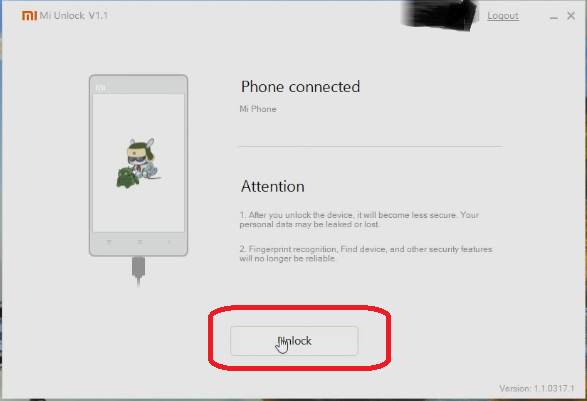
- Once the unlock process completed just hit the reboot button

D. Enable USB Debugging and OEM Unlock
- Enable Developer option- Goto Settings > About phone > tap MIUI version 7 times.
- Enable USB Debugging- Goto Settings > Additional settings > Developer options > USB Debugging and enable it.
- Enable OEM Unlock – Goto Settings > Additional settings > Developer options > Enable OEM Unlock.
E. Install TWRP Recovery in Redmi Note 4
- Copy paste the SuperSu zip and lazyflasher-no-verity-opt-encrypt.zip files from your PC to internal memory of Redmi Note 4.
- Switch of your Redmi Note 4
- Now press and hold Power + Vol DOWN until it boots into fastboot mode
- Now connect your Redmi Note 4 to PC via USB cable.
- Open the platform-tools Folder.
- Inside the folder, hold “Shift” Key then right click and select “Open command Windows here”.
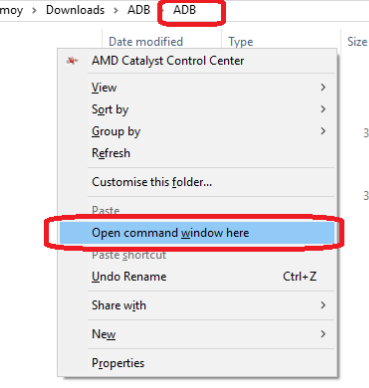
- Now enter this command.
fastboot devices - If its properly connected to your PC it will show your device with some alphanumeric character
- Now its time to flash TWRP, so run this command( Make sure twrp.img file is present in the ADB folder like I have done in Step B)
fastboot flash recovery twrp.img - Once flashing done don’t switch on or switch off your device
- Now Press and hold Power+ Vol Up buttons (Note its Vol Up not like Vol Down in step E.3)
- It will boot into TWRP Mode
F. Install SuperSu and Root Redmi Note 4
- Select the language and then Swipe to allow modification then mount the storage like this.
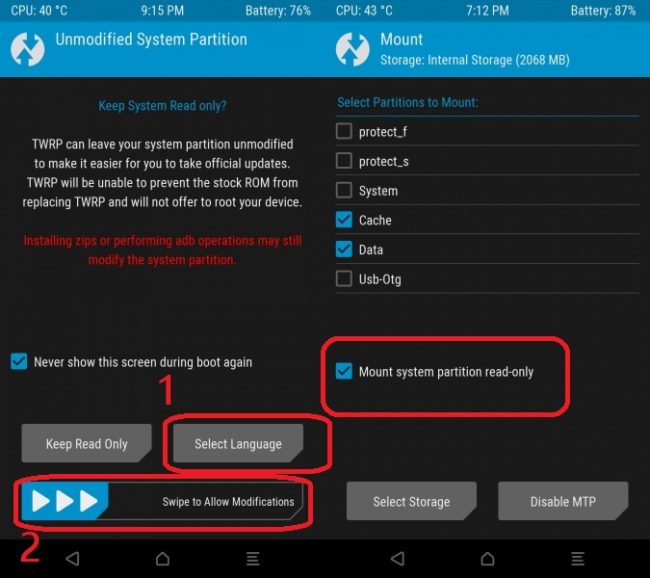
- Now go to the main menu
- Click on Backup and make a backup of current ROM for safety. You can skip this!
- If the backup process is done again go to the main menu and tap on Install
- Then browse the SR3-SuperSU-v2.79-SR3-20170114223742.zip and swipe to Install
- Once the flashing process has done, again tap on Install
- Now browser lazyflasher-no-verity-opt-encrypt.zip and install it
- Now tap on Reboot System
- Your device will reboot and it rooted now.
- Install Root Checker and whether Redmi Note 4 rooted or not.
 |
| How to Root Mi Redmi Note 4 1000% Working |
Incoming Search:
Working method to Root Redmi Note 4
Easy way to Root Redmi Note 4
How can I Root Redmi Note 4
done.......................thanks
Post a Comment