
How to Root Honor 6X 100% work
How to Root Honor 6X
NOTE: Make a backup of all your data including msg, contacts files, images etc.
A. Download Tools
- Download and install Universal ADB Driver
- Download ADB FILES
- Download twrp-3.1.1-0-berlin.img
- Download SuperSU-v2.79-201612051815-EMUI5.0.zip (9.3 MB)
- Download and install Universal ADB Driver
- Download ADB FILES
- Download twrp-3.1.1-0-berlin.img
- Download SuperSU-v2.79-201612051815-EMUI5.0.zip (9.3 MB)
B. File Preparation
- Unzip ADB.zip and you will get ADB Folder
- Install the ADB Driver in your PC
- Rename the twrp-3.1.1-0-berlin.img into twrp.img
C. Enable USB Debugging and OEM Unlock
- Enable Developer option- Goto Settings > About phone > tap version 7 times.
- Enable USB Debugging- Goto Settings > Additional settings > Developer options > USB Debugging and enable it.
- Enable OEM Unlock – Goto Settings > Additional settings > Developer options > Enable OEM Unlock.
D. Unlock bootloader in Honor 6X
- First note down serial number of your Honor 6X on a paper from the box or “about” section in your phone
- Second note down the IMIE number
- Third note down the product ID by typing *#*#1357946#*#* into your dialer app
- Now go to the Huawei unlock website
- Register here and make an account
- Go to the download section and select unlock bootloader
- Agree to the unlocking agreement
- Now you will see a form like this
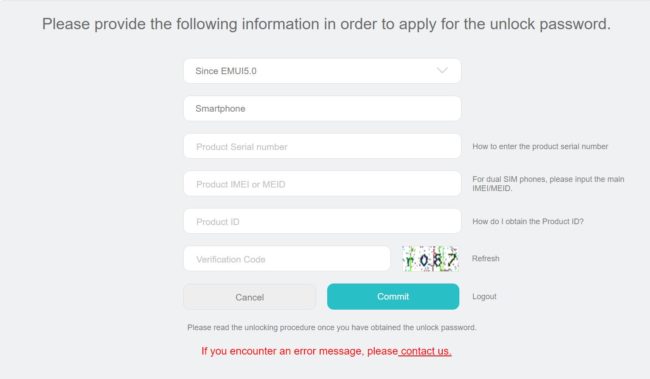
- Now fill up the form as you already note down all the details in first three steps
- Once you have fill up the form correctly tap on select “commit”
- And your unlock code will be shown on the same page, note down this unlock code on a paper
- Plug your phone into your computer via USB cable
- Open the ADB Folder.
- Inside the folder, hold “Shift” Key then right click and select “Open command Windows here”.
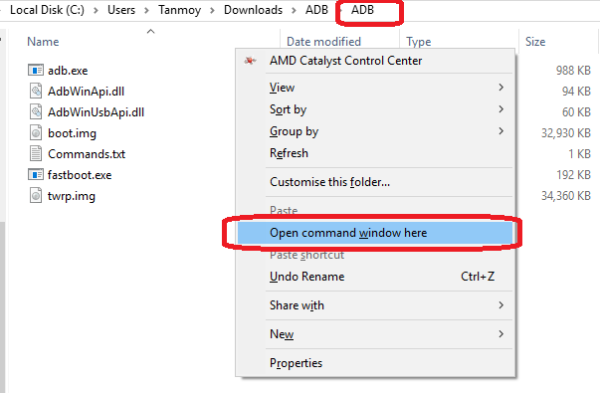
- The Command prompt will open.
- Now enter this command.
adb devices - If its properly connected to your PC it will show your device with some alphanumeric character
- Now type this command and hit enter
adb reboot bootloader - You will that phone will go to bootloader mode. Basically its fastboot mode.
- Now type this command and hit enter, where XXXXXXXXXXXXXXXX – unlock code received previously
fastboot oem unlock XXXXXXXXXX - Follow the on-screen instructions
- The Bootloader is unlocked in Honor 6X! Now disconnect your Phone from PC
- Switch on the Device and Repeat the STEP. C
adb devicesadb reboot bootloaderfastboot oem unlock XXXXXXXXXXE. How to flash TWRP Recovery In Honor 6X
- Connect your phone to PC via USB
- Copy paste the SuperSU 2.79 from your PC to phone
- Open the “ADB FASTBOOT FILES” folder
- Inside the folder, hold “Shift” Key then right click and select “Open command Windows here”
- The Command prompt will open
- Now type this command and hit enter
adb reboot bootloader - It will boot into fastboot mode.
- Now type this command and hit enter
fastboot oem get-bootinfo - If bootloader is unlocked then it will show “Bootloader Lock State: UNLOCKED“
- If its Unlocked then proceed
- Now its time to flash TWRP, so run this command (Make sure twrp.img file is present in the ADB folder like I have done in Step B)
fastboot flash recovery twrp.img - Once it done again run this command to boot into TWRP mode
fastboot boot twrp.img - It will boot into TWRP Recovery Mode.
adb reboot bootloaderfastboot oem get-bootinfofastboot flash recovery twrp.imgfastboot boot twrp.imgF. Install SuperSu and Root Honor 6X
- Select the language and then Swipe to allow modification then mount the storage like this.
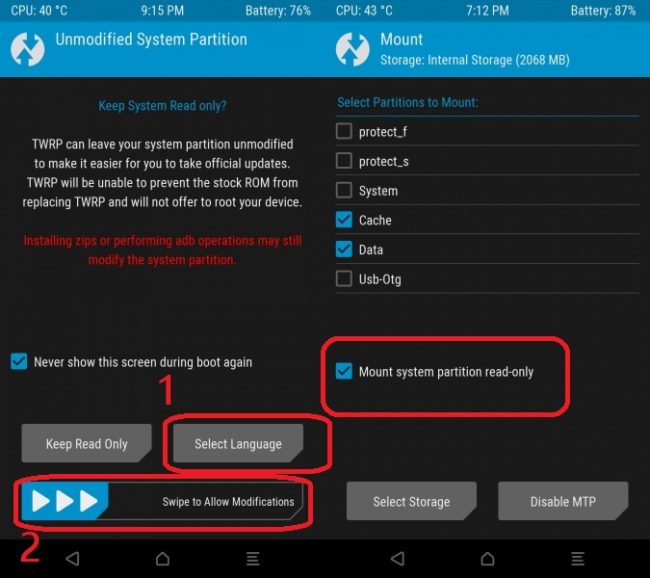
- Now go to the main menu
- Click on Backup and make a backup of current ROM for safety. You can skip this!
- If the backup process is done again go to the main menu and tap on Install
- Then browse the SuperSU-v2.79-201612051815-EMUI5.0 and swipe to Install
- Once the flashing process has done, tap on Wipe Cache/Delvik
- Then tap on Reboot your system.
- The booting process may take 5 to 10 mintutes.
- Install Root Checker and whether Honor 6X rooted or not.
Incoming Search:Working method to Root Honor 6XEasy way to Root Honor 6XHow can I Root Honor 6XRooting of Honor 6X ......done......
thanks
thanks
Post a Comment